

Internet Access for non-OSU Users
Keith Price, ATAMI's IT administrator, needs to register your computer's MAC address for it to access the Internet via the B11 Access network. After locating your MAC address, email it to [email protected] with copy to [email protected]. Include in your email who you are and what tenant or industry company you work for.
MAC Address for Windows computers:
- Click the Start button and type cmd and hit enter.
- In the command window, type getmac /v and hit enter.
- From the list of network adapters, find the one that says something about “Wireless”
- On the “Wireless” line, record/copy the “Physical Address” (a 12-digit string that looks like “08-00-27-00-C0-13”)
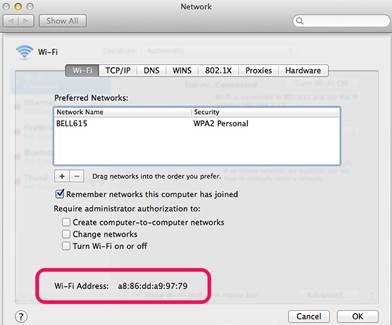
MAC Address for Apple computers:
- From the Apple menu, select System Preferences> Network>Advanced>Wi-Fi. See 12-digit string at bottom.
ATAMI Printers
After the computer is registered, if you want to connect to ATAMI printers, you will need to download the drivers. Find download instructions. It’s important to follow all the instructions! Hint: compressed files must be extracted or this sequence will not be successful.